

New employees
Are you new to the University of Bayreuth or will you be joining us soon? Welcome!
On this page, we have compiled some important information for you about starting at the University of Bayreuth:
Important in the first few days
Good to know
The two subpages for professors and non-academic staff contain specific content for each group.
Important in the first few days

Finding your way around the campus
- Campus maps and roomsHide
-
Campus maps and rooms
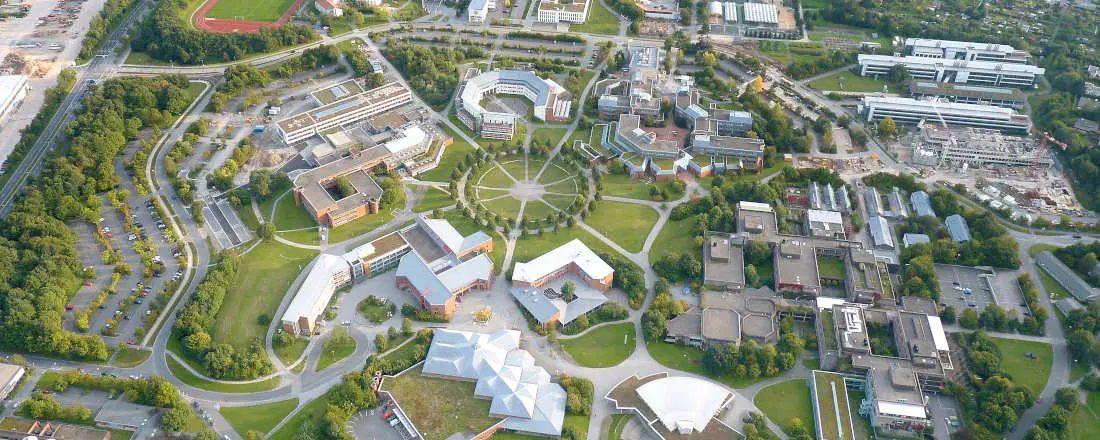
The University of Bayreuth website provides campus maps for the Bayreuth and Kulmbach campuses. Parking areas and bus stops are also marked on these maps. In addition, you will find information on bus connections, the campus surroundings, and the ancillary buildings. Under the heading Room Search and Occupancy, you can get an overview of lecture halls and seminar rooms and their (multimedia) equipment. After logging in to CampusOnline, you can also book rooms.
- Cafeteria, coffee bars and menusHide
-
Cafeteria, coffee bars and menus
The Studentenwerk Oberfranken (SWO) operates a large cafeteria on the Bayreuth campus, which offers inexpensive meals for staff and students. Similar facilities are also available at other locations such as Kulmbach and Nürnberger Str.. The menus for all locations can be viewed online. Payment is cashless only and must be made using the CampusCard. External visitors without a CampusCard can also eat in the cafeteria using a guest card. Guest cards can be issued and topped up at a machine in the main cafeteria next to the university shop.
- CampusCard and bt IDHide
-
CampusCard and bt ID
All students and employees of the University of Bayreuth receive a CampusCard, which provides access to numerous services. The IT Service Centre has summarised the most important information on this on its website. Employees receive the CampusCard when they start work. When a fixed-term employment contract is extended, validation is required to update the card with the changed data. On the back of the CampusCard, you will also find your so-called "bt ID". This is required for registering on the PC, but also for logging in to many other university services.
- AI ChatbotsHide
-
AI Chatbots
Some of the University of Bayreuth’s web pages and applications feature chatbots that can help you with your enquiry. You can find an overview here: https://chatbot.uni-bayreuth.de/.
Persons
- Key allocationHide
-
Key allocation
The Buildings & Grounds Maintenance staff are responsible for issuing keys. To obtain a key and transponder, send an email to schluesselvergabe@uni-bayreuth.de. State your organisational unit and the room numbers for which you require access. Transponder authorisations can be added easily.
- ContactHide
-
Contact
- Dean's Office – You can find your responsible Dean's Office on this page. There you can also obtain your holiday card and green card (flexitime card), among other things.
- ZUV is the German abbreviation for the “Central University Administration”. On the website as well as in the business distribution plan, you will find all contact persons as well as information on legal matters, academic and student affairs, family-friendly university, financial matters, procurement matters, personnel matters, buildings/grounds maintenance and faculty matters, and internal logistics.
- Please familiarise yourself with the most important contact persons in your own area. Your colleagues will be happy to help you with this.
- A medium-sized campus university with around 12,000 students and approximately 2,700 employees needs to be well organised. The intranet provides an overview of the UBT's organisation and includes an organisational chart.
- Employee CouncilHide
-
Employee Council
The Employee Council of the University of Bayreuth is elected every five years by the university's employees. It represents the interests of all employees from the groups of employees and civil servants. On the Employee Council's intranet page, you will find all the information you need on topics such as conflict counselling, mediation, university health management, contact persons, and an overview of companies that offer discounts to University of Bayreuth employees.
In the office
- TelephoneHide
-
Telephone
To make business calls from your telephone, you must dial "9" first. Private calls in urgent cases are possible if you dial "0" first. You will receive a separate bill for these calls.
In the telephone directory, you will find not only the telephone numbers of your colleagues, but also further helpful information such as building and room numbers or the unit to which the colleague is assigned. - Email Outlook web accessHide
-
Email Outlook web access
With your personal user ID, you can also access your University of Bayreuth email account outside the campus via a browser or email programme. All the relevant information has been compiled by the IT Service Centre on their website.
- Corporate design Hide
-
Corporate design
To ensure that the University of Bayreuth has a uniform public image with high recognition value, you will find templates for letters, business cards, email signatures, PowerPoint slides, and much more on the intranet pages of Press, Marketing & Communications.
- Absence policyHide
-
Absence policy
In the event of a prolonged absence (holiday, illness), please set up an out-of-office message in your email programme, naming your substitute. You will find information on this in a corresponding letter on the intranet page of the Human Resources Department (under A).
- Sick leave (incapacity to work)Hide
-
Sick leave (incapacity to work)
In the event of illness, you must notify the university of your incapacity to work immediately, i.e. on the first day of illness before the start of your regular working hours. This also applies if you are on holiday. The notification must be made exclusively using an online form, which can also be accessed from your private PC/mobile phone. This form is also used to report when you have recovered. The Human Resources Department has compiled the most important information on this subject (including on the topics of "sick child", rehabilitation treatment, reintegration, accidents at work).
- Holiday requestsHide
-
Holiday requests
Within the ZUV and the central facilities, holiday requests are submitted via the ZMI time recording system. Instructions can be found under "Time recording" on the Human Resources Department's intranet page. For staff in the research groups and in the faculty administration, holiday requests are submitted using a paper holiday card, as the capacity of the current time recording system is not sufficient for all employees. Please find out about the exact procedure in your area.
- Business and training tripsHide
-
Business and training trips
If you are planning a business or training trip, you must obtain approval in advance and submit a statement of expenses after the trip in order to be reimbursed for the costs incurred. The contact for this is Travel Expenses (III/3). All relevant forms can be found on the Human Resources Department intranet page under D. FAQs are also available there.
- Information securityHide
-
Information security
Information security is particularly important for your daily work on the computer in order to protect your data against unauthorized disclosure, deletion or modification. You will find all the relevant details on the information security page (https://www.its.uni-bayreuth.de/it-sicherheit). The security training courses at https://www.its.uni-bayreuth.de/veranstaltungen-and-kurse-33d18e77994071d5 are particularly important, especially those on e-mail security and password security, as these are the most common ways in which attacks occur.
Important platforms at UBT
- Artificial intelligenceHide
-
Artificial intelligence
The University of Bayreuth enables you to access ChatGPT and DALL-E securely and free of charge via existing licences. Before using AI, you must familiarise yourself with the basics and framework conditions for practical use. The IT-S offers training courses on this topic. These courses and the services available at the UBT can be found on the ITS website.
- Mitarbeiterservice Bayern (authega)Hide
-
Mitarbeiterservice Bayern (authega)
Mitarbeiterservice Bayern – using the authega authentication system – serves as a point of access to the services of the State of Bavaria for its employees. In addition to using the digital folder, you can access forms from the State Office of Finance (LfF), view your personnel data, apply for and settle business trips via BayRMS, and (as a civil servant) apply for your allowances online.
- CampusOnlineHide
-
CampusOnline
CampusOnline (CO) is mainly used by teaching staff and employees in the research groups. It is the CAMPUS management system of the University of Bayreuth. It is used to plan and manage teaching, create, assess and record achievements, record final theses, manage student applications and administer the university's rooms. All employees have read access to CAMPUSonline. For write access, please contact the Student Life Cycle Management department atcmhelp@uni-bayreuth.de. Information on using CO can be found in the online documentation COdoc.
- CMS FionaHide
-
CMS Fiona
CMS Fiona – not to be confused with CAMPUSonline – is the University of Bayreuth's content management system. It can be used to maintain the websites of the university and the individual research groups, faculties, degree programmes, institutes, etc. Further information can be found on the online editorial team's website.
- Digital teaching and Panopto recorderHide
-
Digital teaching and Panopto recorder
The ITS multimedia team supports you in implementing digital learning modules. With the help of the Panopto video platform and the associated Panopto Recorder, you can record short teaching videos and screencasts that you can make available to your students as part of your teaching.
- e-LearningHide
-
e-Learning
E-learning is the university-wide online learning platform used for teaching and internal training. Offers such as IT security training courses may be compulsory e-learning courses for employees. Lecturers can create courses on e-learning under their respective organisations for their courses in order to share course materials such as scripts, PowerPoint slides, and literature.
- HIS QISHide
-
HIS QIS
HIS QIS is the University of Bayreuth's account management programme. After logging into HIS, authorised persons can view their accounts and track account movements and associated receipts. If you need access to view certain accounts (e.g. those associated with a research group), please submit a request for account access to the Finance Department.
- Idea managementHide
-
Idea management
The University of Bayreuth is full of bright minds and great ideas. We have introduced our idea management to ensure that these ideas don't remain locked away in a drawer. All students and staff can contribute their creativity and experience, improving our campus step by step.
- University image databaseHide
-
University image database
Press, Marketing & Communications (PMK) provides all employees of the University of Bayreuth with an image database from which images can be used for official purposes. Instructions for use can be found on the intranet.
- In-house printingHide
-
In-house printing
The university's own in-house printing shop can print various large and small formats, such as flyers, brochures, roll-ups, posters and business cards. You can place your print order in the print shop. In addition, there are many printing stations including scanners available across campus, which you can use to print and scan with your campus card and your device or a USB stick.
- ITS self-service portalHide
-
ITS self-service portal
With the help of the ITS self-service portal, you can manage your own roles and the roles of other employees (IT officers, ordering authorisations, etc.) in your organisational unit, view an overview of the people in your organisational unit and obtain information about your user ID. A user manual can be found on the ITS website.
IT Service Centre
The IT Service Centre supports students and staff with all IT issues relating to the University of Bayreuth. On the ITS website, you will find helpful information on hardware and software, multimedia equipment in rooms, conference technology, storage space and data backup, as well as your account. While the Campus IT Support supports employees in the university's departments and facilities, another team takes care of the central university administration.
Good to know:
- Remote maintenance via TeamviewerHide
-
Remote maintenance via Teamviewer
If you are receiving support from ITS colleagues over the phone, it can sometimes be helpful for troubleshooting if you give them remote access to your computer. You can download the latest version of Teamviewer for this purpose from the ITS helpdesk.
- Wi-Fi access for employees and studentsHide
-
Wi-Fi access for employees and students
The university offers students and staff fast, reliable Wi-Fi and internet access. Eduroam provides university members with encrypted wireless access.
- Access to the university network while working from homeHide
-
Access to the university network while working from home
To use the campus network while working from home, you need a VPN client and, if necessary, a proxy, otherwise you will not be able to access certain services. Laptops for employees of the central university administration are preconfigured accordingly.
Good to know

Information from the university
- Christmas closureHide
-
Christmas closure
The University of Bayreuth is closed over the New Year period. The exact dates are determined each year in consultation with the Employee Council, but usually include the period between 24 December and 6 January. Detailed information will be sent by email from the Human Resources Department. Please plan the appropriate number of holiday and/or flexitime days.
- Working hours on Shrove TuesdayHide
-
Working hours on Shrove Tuesday
The afternoon of Shrove Tuesday is usually a day off work and, in many cases, a day off lectures. The working time to be worked on Shrove Tuesday comprises half of the target time specified for this working day. This means that if the target time is eight hours (full-time employment), four hours must be worked. This regulation only applies if the respective supervisor grants time off for the afternoon.
- Information on safety at workHide
-
Information on safety at work
The Occupational Safety Unit and the Safety Department are your central point of contact for all questions relating to occupational safety, fire protection, first aid and occupational medicine. A list of links on the subject of safety (including emergency calls and accident reporting) can be found on the intranet under Online Services & Links.
- UBT appHide
-
UBT app
The app is primarily aimed at students. However, the preview of the cafeteria menu or the login to emails may also be of interest to employees. It is also necessary to register for University Sport.
- Dates and eventsHide
-
Dates and events
The University of Bayreuth regularly offers events on campus and in the city that are open to all citizens. These include, for example, the monthly city talks in Bayreuth and Kulmbach and the annual summer event "UNIKAT" in July. Further dates can be found in the event calendar. You will also find a summary of dates for the academic year, such as the start and end of lectures.
- University of Bayreuth newsletterHide
-
University of Bayreuth newsletter
Various departments at the University of Bayreuth send out newsletters with the latest information, e.g. the IT Service Centre, the Botanical Garden, and University Health Management. You can find university-wide news, for example, in Campus News, press releases, or the Employee Council. An overview of all newsletters can be found under News & General Information on the intranet.
- University OrchestraHide
-
University Orchestra
The University Orchestra was founded in 1991 and each semester develops a new programme for the end-of-semester concert and other concerts in Bayreuth and the surrounding area. Interested musicians are always welcome.
Benefits
- Microsoft Office 365 free of charge for employeesHide
-
Microsoft Office 365 free of charge for employees
Microsoft Office programmes can be used on work devices on a personal basis. As part of the Microsoft Higher Education Agreement, employees also have the option of installing Microsoft Office 365 ProPlus free of charge on their private computers, tablets and smartphones.
- University Sport and health managementHide
-
University Sport and health management
University Sport, in conjunction with the university health management (UGM) department, offers special courses for university employees. When reviewing the sports programme, simply look for the addition of "employees" in brackets. To participate, you must clock out at the time clock and then clock back in again. Registration is via the Uni Now app. The UGM also offers further information and activities for employees, including an active lunch break at work.
- Company discounts for university employeesHide
-
Company discounts for university employees
On the Employee Council's intranet page (after logging in with your bt ID), you will find a list of companies and shops that offer special discounts to UBT employees upon presentation of their CampusCard. All purchases can only be made in cash or by EC card. All discounts apply to regular goods only and cannot be combined with other discounts.
- Family-friendly universityHide
-
Family-friendly university
The University of Bayreuth is certified as a family-friendly university and promotes the compatibility of family and career. This includes, among other things, support in finding childcare, the option of emergency and after-hours childcare, and summer holiday childcare. All information can be found on the Family-Friendly University website. The Human Resources Department has also compiled important information regarding maternity leave and parental leave.
- JobBikeHide
-
JobBike
Employees of the State of Bavaria have the option of purchasing a JobBike for business and private use on the basis of deferred compensation. The exact terms and conditions can be found on the website https://jobbike-bayern.deutsche-dienstrad.de/.
- Further benefitsHide
-
Further benefits
An overview of other benefits offered by the University of Bayreuth can be found here.
Procurement
- Procurement requestsHide
-
Procurement requests
In principle, all purchases or repair/maintenance orders for the University are handled centrally by the Procurement Department. Our colleagues are available to answer any questions you may have on procurement, inventory, public procurement law, etc. Purchases of IT equipment such as notebooks or accessories must be made directly via the web shop. For software that cannot be purchased via the web shop, as well as for all other purchases, the regular procurement request form must be used. Further forms and information can be found on the intranet under Financial Affairs and Procurement.
- Office supplies ordersHide
-
Office supplies orders
If you require office supplies, you can access the procurement department's stock catalogue via the form server and order the relevant materials.
A wealth of information on office equipment and contact persons can be found in the FAQs. - Equipment exchangeHide
-
Equipment exchange
If you have equipment that is no longer needed at your department, it must be listed on the equipment exchange and made available to others free of charge for official purposes.
- Scientific WorkshopsHide
-
Scientific workshops
The workshops for research and teaching are part of Buildings & Grounds Maintenance, but are located near the various scientific areas. Their tasks include the design, development, manufacture, assembly, maintenance and repair of equipment and test facilities for teaching and research, as well as providing advice on the selection of equipment and materials, storage, etc. The workshops support all university facilities that carry out experimental work and the special research areas. They are divided into the areas of electronics (BGI building), mechanics (in the FAN, GEO, NW I and NW II buildings), glass apparatus construction (NW I building), and carpentry (ZT building).